The Affiliate Center allows affiliates to promote campaigns and earn commissions using unique affiliate links. However, default affiliate links can be cumbersome and less personalized.
To address this, we provide the option to create Custom Affiliate Codes. These codes offer a more branded and memorable way to share affiliate links, enhancing marketing efforts and improving tracking.
In this article, we will explain how you can create your custom affiliate code and personalize your affiliate URL.
What is a Custom Affiliate Code?
A Custom Affiliate Code is a unique identifier that affiliates can customize to make their affiliate URLs more memorable and branded. This custom code replaces the default system-generated affiliate ID in the URL, making it easier to share and remember.
For example:
- Default Affiliate Link:
https://www.workoutwithme.xyz/masterclass?aff=8cbdfbb388836c73b302240703008e21d393cd1302124d1bc13106239f052931 - Affiliate Link with Custom Code “Blog”:
https://www.workoutwithme.xyz/masterclass?aff=blog
Why Use Custom Affiliate Codes?
- Branding and Personalization: Custom codes help in making the affiliate link more personalized and brand-specific.
- Ease of Use: Shorter, meaningful codes are easier to remember and share across platforms.
- Improved Tracking: Custom codes can help affiliates manage and track multiple campaigns effectively.
How Affiliates Can Create Custom Codes in the Affiliate Area
You can create custom affiliate codes directly within the Affiliate Area by following these steps:
- Affiliates should log in to their Affiliate Center and go to the Codes tab.
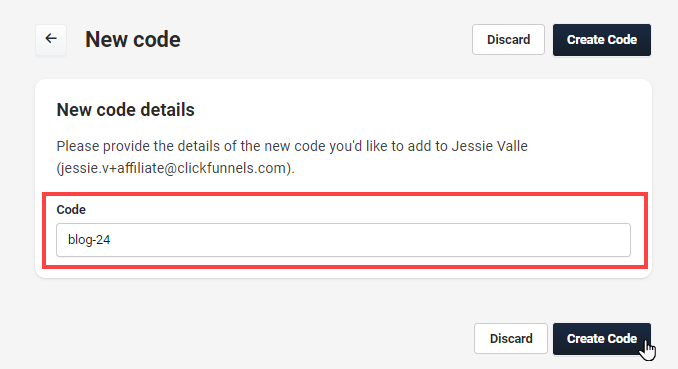
- In the Codes tab, click on the “Create Code” button.
Enter the code in the “Code” field.
You must ensure that the code entered in the Code field is unique. If the chosen code is already in use by another affiliate, it will not be accepted. To create a distinctive and available code, consider adding variations such as numbers or initials. For example, instead of using a common term like blog, try using
blog-24orblog-AJ(using your initials or other unique identifiers).Click “Create Code”: Once a unique code is entered, click Create Code to save it.
How to Generate an Affiliate URL with a Custom Code
After creating a custom affiliate code, affiliates can generate their customized affiliate URL:
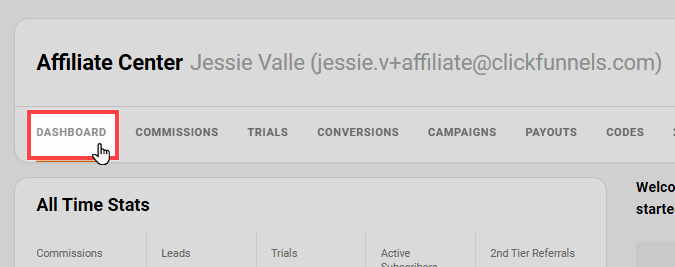
You should log in to the affiliate area and navigate to the Dashboard tab.
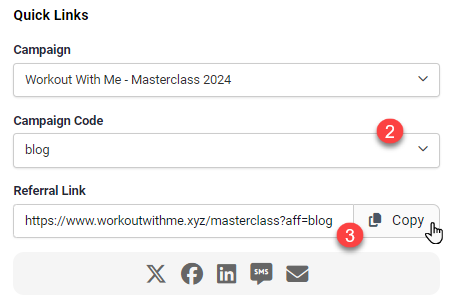
- In the Quick Links section, affiliates can select the desired campaign and the custom code from the dropdown menus.
The custom URL will be displayed in the Referral Link field. Affiliates can copy this link and use it for promotions.
Tracking Commission Performance by Custom Codes
To analyze how different custom codes perform in terms of generating commissions, you must export the commission data:
- You should log in to your affiliate dashboard and navigate to the Commissions tab.
- Click the “Export” button to download all the commissions into a CSV file.
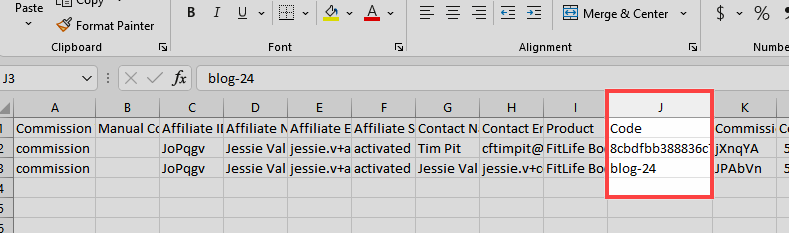
Open the CSV file and look for the Code column. This column will display the custom affiliate code associated with each commission. Affiliates can evaluate which custom codes have been most effective in generating commissions.
Was this article helpful?
That’s Great!
Thank you for your feedback
Sorry! We couldn't be helpful
Thank you for your feedback
Feedback sent
We appreciate your effort and will try to fix the article